Tuesday, April 30, 2013

Sunday, January 20, 2013
Wednesday, December 5, 2012
WHAT IS SOFTWARE?
What is Software?
Software is the general term for information that's recorded onto some kind of medium. For example, when you go to the video store and rent or buy a tape or DVD, what you're really getting is the software that's stored on that tape or disk. Your VCR or DVD player are hardware devices that are capable of reading the software from a tape or disk and projecting it onto your TV screen, in the form of a movie.
Your computer is a hardware device that reads software too. Most of the software on your computer comes in the form ofprograms. A program consists of "instructions" that tell the computer what to do, how to behave. Just as there are thousands of albums you can buy on CD for your stereo, and thousands of movies you can buy to play on your VCR or DVD player, there are thousands of programs that you can buy to run on your computer.
When you buy a computer, you don't automatically get every program produced by every software company in the world. You usually get some programs. For example, when you buy a computer it will probably have an operating system (like Windows XP) already installed on it.
If you do purchase a specific program, it would be to perform some specific task. For example, you might use a graphicsprogram to touch up photos, or you might use a word processing program to write text. You're using your Web browserprogram right now to read this text (assuming you're not reading a printed copy on paper). Just as there are umpteen different brands of toothpaste, there are umpteen different brands of word processing programs, graphics programs, and Web browsers.
 For example, all graphics programs are designed to help you work with pictures. But there are many brands of graphics programs out there, including Adobe Photoshop, Jasc Paint Shop Pro. Adobe Illustrator, Arcsoft PhotoStudio, Corel Draw, ULead PhotoImpact, PrintShop Photo, and Macromedia Freehand, just to name a few. As to Web browsers, popular brands include Microsoft Internet Explorer, MSN Explorer, Netscape Navigator, America Online, and a few others.
When you purchase a program, you get the program stored on a CD as in the example shown at left. You may not have seen any boxes containing software when you bought your computer. That's because the software that came with your computer has been pre-installed onto your computer's hard disk for you. You don't need to use the CD to run a program that's already installed on your computer. You only need to keep the CDs as backups, in case something goes wrong with your hard disk and you need to re-install the programs.
What Programs Do I Have?
Perhaps you're wondering what programs are installed on your computer. Usually when you buy a computer, they tell you what programs you're getting with it. So if you were to go back to the original ad from which you bought your computer, you'd probably find the names of programs you already have listed there. Though there's no need to do that, because every program that's currently installed on your computer is listed in your All Programs menu (assuming you're using Windows XP).
When you first open the Start menu, the left column lists programs you've used the most recently (Figure 1). If your computer is brand new, then the programs listed there will just be some examples.

Figure 1
That little list of program icons and names on the left side of the menu doesn't represent all the programs that are currently installed on your computer. Not by a long shot. The All Programs option on the Start menu provides access to all your installed programs. When you first click on (or just point to) the All Programs option, the All Programs menu that appears (Figure 2) will show icons and name of program groups, as well as some programs.

Figure 2
It's easy to tell the difference between a program and a program group. The program groups all have the same icon, and all have a right-pointing triangle (4) at their right side. When you click on, or point to, a program group, icons and names of programs within that group appear on a submenu. The submenu will contain programs within that group, and perhaps some more program groups. For example, Figure 3 shows the result of clicking on the Accessories program group in the All Programs menu. The submenu that opens contains more program groups, and specific programs you can run.

Figure 3
Your Start menu won't look exactly like the one shown in the figures, because different computers have different programs installed. (Just like different people who own CD players own different CDs).
Running Programs
When you click on the icon for a program, the program opens. Which means the program appears on the screen, so you can use it. Each program will appear in its own program window on the Windows desktop. For example, in Figure 4 the photograph in the background is the Windows desktop. Floating about on top of that desktop are four different program, each in its own separate program window.

Figure 4
Elements of Program Windows
While not two programs are exactly alike, most program windows contain certain similar elements. Stretched across the top of the program window is the title bar, which usually shows the name of the program that's inside the program window.Beneath the title bar is the menu bar, which gives you access to the tools and capabilities of that specific program. Many programs have a toolbar under their menu bar. The toolbar provides quick one-click access to frequently-used commands in the menu bar. The status bar at the bottom of a program provides general information. Figure 5 shows, in animated form, the title bar, menu bar, toolbar, and status bar of several different sample programs.

Figure 5
What's Available?
If you ever want to get an idea of the different types of programs that are available for your Windows XP computer, just go to any large computer store, or even a large office supply store like Staples, and take a look at the computer software. Or, you could even go into a large bookstore and look at the computer books sections. There will probably be a ton of books -- all for different programs like Microsoft Word, Microsoft Excel, WordPerfect, and of course Windows XP.
If you're comfortable using the World Wide Web, you can check our programs that are available by visiting the Windows Catalog Web site at:
When you get to the Windows Catalog home page, click on the Software tab near the top of the page. Then click on the various categories of programs at the left side of the page (Figure 6). Each will display a submenu if types of programs within that category. You can click on any subcategory name to view programs within that subcategory. Or you can just click on any category name in that left column.

Figure 6
Keep in mind that there's a huge difference between viewing programs on your own Start menu, and viewing programs at the Windows Product Catalog Web site or a computer store. Programs on your Start menu are already installed on your computer and ready for you to use. Programs in a store or presented on the Windows Catalog Web site are programs you could buy and install on your computer.
Remember, software is to a computer as music is to a CD player, or as a movie is to a VCR. There are thousands of programs available for your PC, and no two people have exactly the same programs on their computers. The programs that are installed on your computer can all be found, and started from, the All Programs menu (or some program group that's accessible from All Programs menu). Windows XP, the topic of this course, is software too.
WHAT IS INTERNET DOWNLOAD MANAGER
Internet Download Manager (IDM) is a tool to increase download speeds by up to 5 times, resume and schedule downloads. Comprehensive error recovery and resume capability will restart broken or interrupted downloads due to lost connections, network problems, computer shutdowns, or unexpected power outages. Simple graphic user interface makes IDM user friendly and easy to use.Internet Download Manager has a smart download logic accelerator that features intelligent dynamic file segmentation and safe multipart downloading technology to accelerate your downloads. Unlike other download managers and accelerators Internet Download Manager segments downloaded files dynamically during download process and reuses available connections without additional connect and login stages to achieve best acceleration performance.
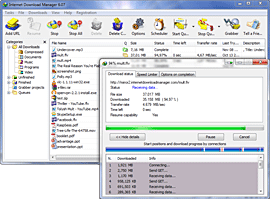 Internet Download Manager supports proxy servers, ftp and http protocols, firewalls, redirects, cookies, authorization, MP3 audio and MPEG video content processing. IDM integrates seamlessly into Microsoft Internet Explorer, Netscape, MSN Explorer, AOL, Opera, Mozilla, Mozilla Firefox, Mozilla Firebird, Avant Browser, MyIE2, and all other popular browsers to automatically handle your downloads. You can also drag and drop files, or use Internet Download Manager from command line. Internet Download Manager can dial your modem at the set time, download the files you want, then hang up or even shut down your computer when it's done.
Other features include multilingual support, zip preview, download categories, scheduler pro, sounds on different events, HTTPS support, queue processor, html help and tutorial, enhanced virus protection on download completion, progressive downloading with quotas (useful for connections that use some kind of fair access policy or FAP like Direcway, Direct PC, Hughes, etc.), built-in download accelerator, and many others.
Version 6.12 adds IDM download panel for web-players that can be used to download flash videos from sites like YouTube, MySpaceTV, and Google Videos. It also features complete Windows 7 and Vista support, YouTube grabber, redeveloped scheduler, and MMS protocol support. The new version also adds improved integration for IE and IE based browsers, redesigned and enhanced download engine, the unique advanced integration into all latest browsers, improved toolbar, and a wealth of other improvements and new features.
DIFFERENCE BETWEEN COPY AND TERA COPY
TeraCopy copies files faster than the normal process of copying files (the Windows' way of copying).
TeraCopy can also test if the original and copied files are exactly identical to avoid errors on copied files.
The file testing consumes another more or less half the time it took to copy the files. In my opinion, spending that much time for the files' integrity is better than going back from work or school to copy the file again (because you discovered that the copied file is corrupted in some parts).
There are unnoticeable events that an error could occur during the process of copying a file, which results to incomplete or corrupted files.
TeraCopy can also test if the original and copied files are exactly identical to avoid errors on copied files.
The file testing consumes another more or less half the time it took to copy the files. In my opinion, spending that much time for the files' integrity is better than going back from work or school to copy the file again (because you discovered that the copied file is corrupted in some parts).
There are unnoticeable events that an error could occur during the process of copying a file, which results to incomplete or corrupted files.
TOP 300 FREE SOFTWARES
Office
OpenOffice - office suitePC Suite 602 - office suite
AbiWord - text editor
Atlantis Nova - text editor
Microsoft PowerPoint Viewer - power point files viewer
Adobe Reader - pdf reader
Foxit PDF Reader - pdf reader
PDFCreator - create pdf documents
Doc Convertor - document convertor
Convert - unit convertor
Converber - unit convertor
Sunbird - calendar/organizer
EssentialPIM Free - calendar/organizer
PhraseExpress - speed up your writing
ATnotes - create notes on the desktop
Archive managers
7-Zip - compression programIZArc - compression program
TugZIP - compression program
CabPack - compression program
Universal Extractor - extract files from any type of archive
Internet
Firefox - web browserInternet Explorer- web browser
Maxthon - web browser
Opera - web browser
Avant Browser - web browser
Thunderbird - email client
PopTray - check for emails
Free Download Manager - download manager
FlashGet - download manager
WellGet - download manager
Download Master - download manager
WGET - commandline download manager
HTTrack - offline browser
WebReaper - offline browser
Yeah Reader - RSS reader
GreatNews - RSS reader
RSSOwl - RSS reader
P2P
µTorrent - torrent clientAzureus - torrent client
BitComet - torrent client
ABC - torrent client
BitTornado - torrent client
eMule - p2p client
SoulSeek - p2p client
Shareaza - p2p client
DC++ - Direct Connect network client
PeerGuardian - IP blocker
Chat
Miranda - chat clientMSN Messenger - chat client
Yahoo Messenger - chat client
QIP - chat client
Gaim - chat client
JAJC - chat client
HydraIRC - IRC client
Talkative IRC - IRC client
IceChat - IRC client
Skype - VOIP client
Google Talk - VOIP client
VoipStunt - VOIP client
Gizmo - VOIP client
Wengo - VOIP client
Security
AVG Free - antivirusAvast Home Free - antivirus
AntiVir PersonalEdition - antivirus
BitDefender Free - antivirus
ClamWin - antivirus
CyberDifender - Internet Security Suite
Ad-aware - anti-spyware
Spybot: Search & Destroy - anti-spyware
Windows Defender - anti-spyware
SpywareBlaster - anti-spyware
Spyware Terminator - anti-spyware
Tootkit Reveaker - rootkit detection utility
Winpooch - system protection
HiJack Free - system protection
HighJackThis - hijackers detector and remover
Kerio Personal Firewall - firewall
Sygate Personal Firewall - firewall
ZoneAlarm - firewall
AxCrypt - file encryption
Simple File Shredder - securely delete files
PuTTy - SSH client
KeePass - password manager
LockNote - password manager
nPassword - password manager
Microsoft Baseline Security Analyzer - identify security misconfigurations
Network
Hamachi - VPN clientRealVNC - remote control
UltraVNC - remote control
Ethereal - local area network administration
The Dude - network administration
Wireshark - network administration
Angry IP Scanner - IP scanner
IP-Tools - IP scanner
Free Port Scanner - IP scanner
NetMeter - network bandwidth monitoring
Servers
FileZilla - FTP clientFileZilla Server - FTP server
EFTP - FTP client/server
XAMPP - integrated server package of Apache, mySQL, PHP and Perl
WAMP - Apache, PHP5 and MySQL server
Audio
Foobar2000 - audio playerWinAmp - audio player
1by1 - audio player
JetAudio - audio player
XMPlay - audio player
Xion - audio player
Apollo - audio player
MediaMonkey - music organizer
The GodFather - music organizer
dBpowerAMP - audio converter
Audacity - audio converter
WavePad - audio converter
Kristal Audio Engine - audio editor
Exact Audio Copy - CD ripper
Audiograbber - CD ripper
CDex - CD ripper
Mp3 Tag Tools - tag editor
Mp3tag - tag editor
Taggin’ MP3 - tag editor
Monkey’s Audio - APE compressor/decompressor
mpTrim - mp3 editor
WavTrim - wave editor
EncSpot Basic - analyse mp3 files
Video
Windows Media Player - audio/video playerVLC - video player
Media Player Classic - video player
MV2Player - video player
CrystalPlayer 1.95 - video player
Zoom Player - video player
GOM Player - video player
viPlay - video player
DSPlayer - video player
VirtualDub - video editor
CamStudio - video screen recording
AviSplit - Avi splitter
Video mp3 Extractor - rip audio from video files
Free iPod Converter - convert all popular video formats to iPod video
MediaPortal - turning your PCinto a Media Center
The FilmMachine
Image
Gimp - image editorPhotoFiltre - image editor
Paint.net - image editor
ArtRage - image editor
Artweaver - image editor
IrfanView - image viewer
Picasa - image viewer
XnView - image viewer
FastStone Image Viewer - image viewer
FuturixImager - image viewer
Easy Thumbnails - create thumbnails from images
JoJoThumb - create thumbnails from images
iWebAlbum - create web photo albums
JAlbum - create web photo albums
3D Box Shot Maker - design quality box shot
FastStone Capture - screen capture
WinSnap - screen capture
3D
Blender3D - 3D renderer3Delight Free - 3D renderer
SketchUp - 3D modeling
Maya Learning Edition - 3D modeling
Developers
AutoIt - task automationSciTE4AutoIt3 - text editor for AutoIt
AutoHotkey - task automation
PHP Designer - PHP editor
Notepad++ - text editor
ConTEXT Editor - text editor
PSPad - text editor
FoxEditor - text editor
Crimson Editor - source code editor
Elfima Notepad - text editor
Notepad2 - text editor
Nvu - HTML editor
Alleycode - HTML editor
BlockNote - web page editor
Weaverslave - web page editor
CD/DVD
DeepBurner - CD/DVD burnerCDBurner XP Pro - CD/DVD burner
BurnAtOnce - CD/DVD burner
Express Burn - CD/DVD burner
Zilla CD-DVD Rip’n’Burn - CD/DVD burner
ImgBurn - ISO, BIN burner
Daemon tools - virtual CD/DVD
DVD Decrypter - DVD ripper
DVD Shrink - DVD ripper
Nero CD-DVD Speed - CD/DVD info and quality test
Codecs
GSpot - codec informationAC3Filter - audio codec
Xvid - video codec
QuickTime Alternative - video codec
Real Alternative - video codec
K-Lite Codec Pack - all codecs
System Ulilities
CCleaner - system cleanerxp-AntiSpy - OS setup
jv16 Powertools - system utilities
XP SysPad - system monitoring utility
What’s Running - process guard
Registrar Lite - registry editor
WinIPConfig - replacement for “ipconfig.exe” and “route.exe”
Unlocker - file eraser
Eraser - secure file eraser
Undelete Plus - file recovery
freeCommander - file manager
ExplorerXP - file manager
Duplicate File Finder - find all duplicate files
Ant Renamer - file renaming
ReNamer - file renaming
Icons From File - icos extractor
Chaos MD5 - MD5 generator
HashTab - MD5, SHA1 and CRC-32 file hashes
Rainlendar Lite - desktop calendar
Weather Watcher - weather firecast
Subtitle Workshop - subtitles editor
Ant Movie Catalog - movie organizer
Disclib - CD organizer
Dexpot - virtual desktops
DriveImage XML - create partition images
MozBackup - backup and restore bookmarks, etc.
SyncBack - system backup
Atomic Cock Sync - syncronize your clock
Citrus Alarm Clock - alarm clock
TaskSwitchXP - Alt-Tab replacement
Launchy - application launcher
allSnap - make all windows snap
Sysinternals Tools - various system tools
StrokeIt - mouse gestures
Net Profiles - create profiles of your network settings
ResourceHacker - view, modify, rename, add, delete
Java Runtime Environment - java for Windows
UI Enhancements
RocketDock - application launcherAveDesk - desktop enhancer
IconPhile - customize windows’s system icons
CursorXP Free - change mouse cursors
MacSound - volume control
LClock - Windows Longhorn clock
Y’z Dock - application launcher
Y’z Shadow - shadow effect to the windows
Y’z Toolbar - change the toolbar icons in Explorer and Internet Explorer
Taskbar Shuffle - rearrange the programs on the taskbar by dragging
Visual Task Tips - thumbnail preview image for each task in the taskbar
Badges - put badges on any folder or file
Folderico - change icons of the folders
Folder Marker - mark your folders
Folder2MyPC - add favourite locations to My Computer
Microsoft TweakUI - system settings
BricoPacks - shell packs
ShellPacks - shell packs
Tango Shell Patcher - shell patcher
XPize - GUI enhancer
Vista Transformation Pack - complete visual style
Vista Sound Scheme - Windows Vista sound scheme
Royale Theme - visual style
Hardware monitoring/Benchmarking
CPU-Z - cpu informationCrystalCPUID - cpu information
Central Brain Identifier - cpu information
Everest - system information
SiSoft Sandra - system information
SpeedFan - hardware monitor
Memtest86 - memory test
PowerMax - HDD test
3Dmark 06 - 3D game performance benchmark
Aquamark - performance benchmark
rthdribl - 3D benchmark
Fraps - 3D benchmark, fps viewer and screen recorder
Prime 95 - cpu benchmarking
SuperPI - cpu benchmarking
CPU Rightmark - cpu overclock
Core Temp - cpu temperature
ATiTool - video overclock
ATI Tray Tools - Radeon tweaker
aTuner - GeForce and Radeontweaker
RivaTuner - video overclock
Nokia Monitor Test - monitor adjustmets
UDPixel - fix dead pixels
Games
123 Free Solitaire - solitaire games collectionArcade Pack - classic arcade games
Live For Speed - online racing simulator
Enigma - puzzle game
Freeciv - multiplayer strategy game
Tux Racer - race down steep, snow-covered mountains
Education
SpeQ Mathematics - mathematics programDia - diagram creation program
Google Earth - explore the world
NASA World Wind - 3D virtual globe
Celestia - explore the space
Stellarium - planetarium
Miscellaneous
nLite - Build your own custom Windows disk.VirtualPC - create virtual machines
grabMotion - webcam capture
iDailyDiary - simple page-for-a-day diary
Pivot Stickfigure Animator - create stick-figure animations
Wink - create presentations
Scribus - professional page layout
FreeMind - midn mapping software
Windows Live Writer - WYSIWYG blog authoring
Wallpapers
Michael Swanson - 1920 x 1200; 1600 x 1200; amazing wallpapersMikhail Arkhipov - 1920 x 1200; 1600 x 1200; amazing wallpapers
The services such as ip phones, domain name registration, speed, storage space etc are provided by the web hosting providers. Our life is made easier because of many programs and software tools available in the market like. Macromedia Dreamweaver is the best website design software available in today’s world. SOS along with live protection or security gives nonstop online backup of all your files Advanced web ranking software swiftly discover if your website is moving up or down in the search engine ranking. All these three services (seo, backup and web designing) are also provided bywebhosting net.
TOP ANTIVIRUS SOFTWARES
Here is the list of Best 10 Antivirus Applications of 2009. Most of these come with following testing certifies.
- ICSA Certified
- VB100% Certified
- W.C.L Level 1 Certified
- W.C.L Level 2 Certified
01. Kaspersky Anti-Virus

Kaspersky Antivirus often treated as the best available Antivirus application and has a special version for file servers. It covers almost all sections needed for a top class security. Kaspersky provides hourly virus definition update to keep you up-to-date.
Kaspersky Antivirus often treated as the best available Antivirus application and has a special version for file servers. It covers almost all sections needed for a top class security. Kaspersky provides hourly virus definition update to keep you up-to-date.
02. BitDefender Antivirus
 BitDefender is one of the best antivirus with top class defending ability. It provides hourly definition updates for latest threats. BitDefender comes with P2P File Sharing and Registry Startup Protection but lacks Email scanning.
BitDefender is one of the best antivirus with top class defending ability. It provides hourly definition updates for latest threats. BitDefender comes with P2P File Sharing and Registry Startup Protection but lacks Email scanning.
03. Trend Micro

Trend Micro is a well-known and popular antivirus with Spyware and Adware Protection. It has some great features including Remote File Lock that safeguards your private files in case your laptop is lost or stolen. But lacks P2P File Sharing and Registry Startup Scanning.
Trend Micro is a well-known and popular antivirus with Spyware and Adware Protection. It has some great features including Remote File Lock that safeguards your private files in case your laptop is lost or stolen. But lacks P2P File Sharing and Registry Startup Scanning.
04. Norton Antivirus/ Internet Security

Norton Antivirus is one of the most popular and well-known antivirus application. The latest version has the ability to map your wireless home network and safeguards your wi-fi networks. Recently Norton has introduced a special version for gaming PCs known as Norton 2009 Gaming Edition. It comes with daily virus definition update but no support for P2P File Sharing and Registry Startup Protection.
Norton Antivirus is one of the most popular and well-known antivirus application. The latest version has the ability to map your wireless home network and safeguards your wi-fi networks. Recently Norton has introduced a special version for gaming PCs known as Norton 2009 Gaming Edition. It comes with daily virus definition update but no support for P2P File Sharing and Registry Startup Protection.
05. McAfee Antivirus

McAfee is one of the leading antivirus in security industry. McAfee introduced 2 features ScriptStopper and WormStopper. But it has no support for P2P File Sharing, Instant Messenger and Registry Startup. The inbuilt updater updates virus definitions on a regular basis to keep your up-to-date.
McAfee is one of the leading antivirus in security industry. McAfee introduced 2 features ScriptStopper and WormStopper. But it has no support for P2P File Sharing, Instant Messenger and Registry Startup. The inbuilt updater updates virus definitions on a regular basis to keep your up-to-date.
06. Panda Antivirus Pro 2009

Panda Antivirus comes with a new feature call UltraFast scan engine that scan almost 30% faster compared to other antivirus applications. It has few unique features as follows
Panda Antivirus comes with a new feature call UltraFast scan engine that scan almost 30% faster compared to other antivirus applications. It has few unique features as follows
- Identity protection through Anti-Phishing Filter and Anti-Banking Trojans Engine
- Panda Antivirus has an advanced heuristic scan which maximum possible identity theft
- Inbuilt Personal Firewall

The latest version of ZoneAlarm antivirus comes with strong removal ability of most dangerous viruses and multilayered security for your PC. But it is not certified by any of the three major independent testing labs Virus Bulletic, Checkmark, or ICSA. Zone Alarm scans uses lesser possible system resources.

NOD32 is one of the leading antivirus applications with feature like
- Blocking all attempts to collect and forward your personal and confidential data
- Provides best protection against zero day threat and attacks
- Virus definition updates comes in very small size compared to others
- Multi layered protection including real-time email scanning
09. AVG Antivirus

AVG is one of oldest and widely used antivirus. Latest version of AVG comes with a clean interface and the core scanning engine changed for better performance with multi-core processors. Now the AVG Antivirus comes with two separate standalone applications AVG anti-spyware and AVG Antirootkit to give your best possible security.

F-Secure Antivirus is quite easy to use and comes with pre-defined options for known threats. F-Secure heuristic scanner is considered as one of fastest. It provides new definition update on every two hours to provide you best possible security from most latest threats. It supports emails scanning for both Outlook and Thunderbird.
Subscribe to:
Comments (Atom)